Grids & Multi-Block Domains¤
PICT discretizes the flow domain into one or more blocks. Each block is a structured grid, a regular arrangement of quadrilateral (2D) or hexahedral (3D) cells, which may be stretched, curved and refined. Blocks are glued together along whole faces. This combines the efficiency of structured grids (regular memory layout, fast GPU kernels, standard convolutions) with enough geometric flexibility for obstacles, airfoils and wall-refined channels.
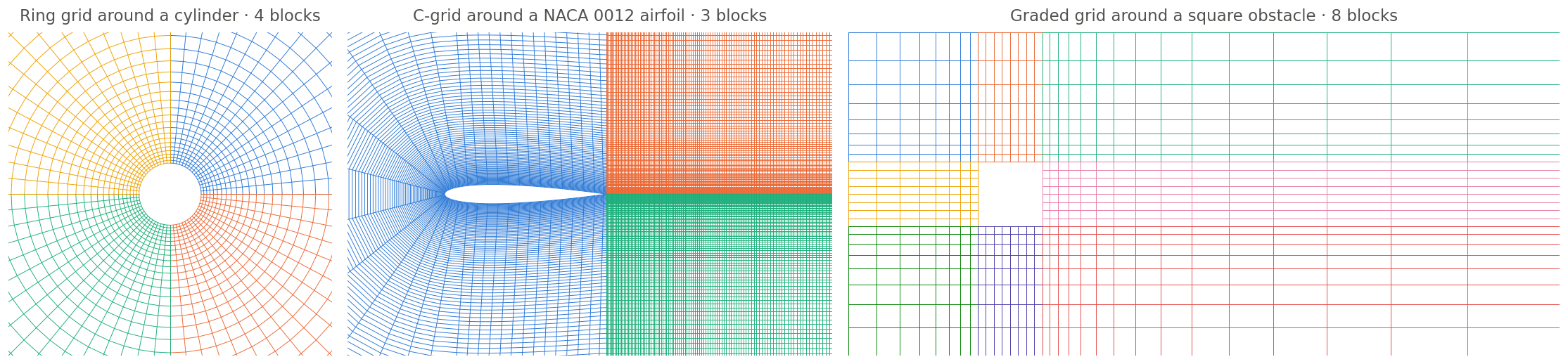
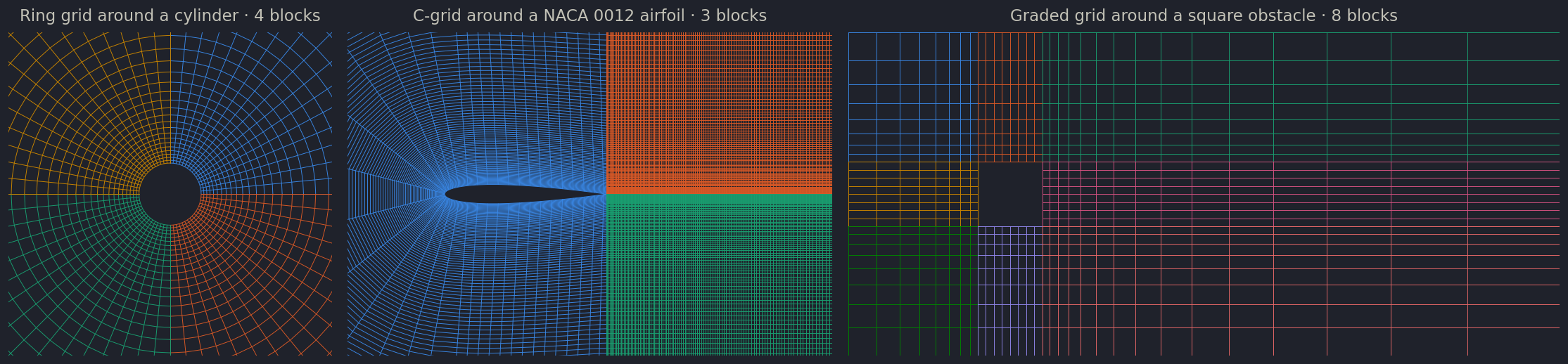
vortex_street_torus_sample.py, 16 instead of 32 cells per quarter, zoomed in; the full grid extends to radius 8). Middle: C-grid around a NACA 0012 airfoil with two wake blocks (airfoil_sample.py with airfoil_res_div=4). Right: graded grid around a square obstacle (vortex_street_refined_sample.py, 8 instead of 32 cells along each obstacle side).Uniform blocks¤
The simplest block is created from its resolution alone. All cells then have unit size, so a block of 64 × 32 cells spans 64 × 32 length units, and no transformation is stored:
block = domain.CreateBlockWithSize(PISOtorch.Int4(x=64, y=32), name="Block")         # 2D
block = domain.CreateBlockWithSize(PISOtorch.Int4(x=64, y=32, z=32), name="Block")   # 3D
All fields (velocity, pressure, passive scalars) are created and initialized with zeros.
Curvilinear blocks from vertex coordinates¤
For any other geometry, pass the coordinates of the cell corners:
# grid: tensor of shape [1, dims, (z+1,) y+1, x+1] with the x/y(/z) coordinates of all cell vertices
block = domain.CreateBlock(vertexCoordinates=grid.cuda().contiguous(), name="Block")
From the vertices, PICT computes per-cell transformation metrics: the Jacobian matrix of the mapping from the computational (index) space to physical space, its inverse, and its determinant, which is the cell volume. The equations are then solved in computational space with these metrics (see Numerical Method). Useful accessors:
| Accessor | Returns |
|---|---|
block.getCellCoordinates() |
cell-center coordinates, [1, dims, (z,) y, x] |
block.getCellSizes() |
cell volumes, [1, 1, (z,) y, x] |
block.vertexCoordinates |
the vertex tensor the block was created from |
block.transform |
per-cell metrics, channels-last [1, (z,) y, x, 2·dims² + 1] (matrix, inverse, determinant) |
domain.getVertexCoordinates() |
list with the vertex tensors of all blocks |
You can also pass initial fields to CreateBlock(velocity=..., pressure=..., passiveScalar=...). Fields you leave out are zero-initialized.
Mesh generation helpers¤
lib/data/shapes.py contains small helpers that create vertex tensors:
| Function | Creates |
|---|---|
make_wall_refined_ortho_grid(res_x, res_y, corner_lower=(0,0), corner_upper=(1,1), wall_refinement=[], base=1.05) |
2D orthogonal grid, exponentially refined towards the listed walls ("-x", "+x", "-y", "+y"); base is the size ratio between neighboring cells |
extrude_grid_z(grid, res_z, start_z=0, end_z=1, weights_z=None, exp_base=1.05) |
3D grid by extruding a 2D grid in z; weights_z can be "LINEAR" (default), "EXP"/"EXP_BOTH", "EXP_START", "EXP_END" or an explicit list |
make_torus_2D(res, r1, r2, start_angle, angle) |
a ring segment between radii r1 and r2 with approximately square cells; x runs along the angle, y radially |
generate_grid_vertices_2D(res, corner_vertices, border_vertices=None, x_weights=None, y_weights=None) |
a general four-sided block, interpolated from its 4 corners and optional curved borders (used for the airfoil C-grid) |
make_weights_linear, make_weights_exp, make_weights_cos |
1D vertex distributions for the *_weights arguments |
rotate_grid(grid, angle, ...) |
rotates and distorts a grid, e.g. to test robustness on non-orthogonal meshes |
import lib.data.shapes as shapes

# 2D cavity grid, refined towards all four walls (from minimal_lid_sample.py)
grid = shapes.make_wall_refined_ortho_grid(32, 32, wall_refinement=["-x", "+x", "-y", "+y"], base=1.10)

# the same grid extruded to 3D (from minimal_lid_sample3D.py)
grid3D = shapes.extrude_grid_z(grid, 32, 0, 2)
Use lib.util.output.plot_grids(domain.getVertexCoordinates(), path=out_dir) to check a mesh. The simulation also plots the grid of 2D domains into its log directory when image output is enabled.
Connecting blocks¤
Blocks are joined with Block.ConnectBlock:
faceStringandotherFaceStringare"-x","+x","-y","+y","-z"or"+z"(an overload takes the indices 0–5 in that order). The face ofblockis glued to the face ofotherBlock. The connection is set up in both directions.- The remaining (tangential) axes must be mapped as well.
axis1Stringdescribes this block's axis(face_axis + 1) % dims, andaxis2String(3D only) describes axis(face_axis + 2) % dims. Each is given as a face string of the other block: the letter selects the axis it aligns with, and the sign gives the orientation,-for the same direction and+for inverted. - Connections are conforming: the two faces must have the same number of cells along the matched axes, and cells connect one-to-one. Each face connects as a whole.
- Connecting a face that was periodic turns the opposite face of the same block into a no-slip wall, because the periodic pair is broken. Set up the connections first and assign boundary values afterwards, as the samples do.
Examples from the samples:
# ring of 4 segments around a cylinder (vortex_street_torus_sample.py):
# +x of each segment continues into -x of the next one, y (radial) is aligned
axes = ["-y", "-z"] if dims == 3 else ["-y"]
for i in range(4):
    ring[i].ConnectBlock("+x", ring[(i + 1) % 4], "-x", *axes)

# C-grid around an airfoil (airfoil_sample.py): the two ends of the C-block meet the
# wake blocks with flipped orientation, the wake blocks meet each other directly
block_airfoil.ConnectBlock("-x", block_tail_upper, "-x", "+y")
block_airfoil.ConnectBlock("+x", block_tail_lower, "-x", "-y")
block_tail_upper.ConnectBlock("+y", block_tail_lower, "-y", "-x")
Across connections, the CUDA kernels look up neighbor cells on the fly and take the axis mapping and orientation of the connected block into account. All blocks share one global linear system per solve, so the blocks are coupled implicitly. There is no iteration between blocks.
Periodic boundaries¤
By default, every face of a new block is periodic: a single block on its own is a periodic box. Periodicity is defined per axis and wraps around within the same block:
block.MakePeriodic("z")   # make one axis periodic again, e.g. after closing all boundaries
block.MakeAllPeriodic()
To make a multi-block domain periodic, connect the outer faces of the end blocks to each other with ConnectBlock, as vortex_street_sample.py does for its periodic channel.
Mesh quality and orientation¤
- Consistent orientation. All blocks should have the same handedness.
domain.GetCoordinateOrientation()returns the common sign of the cell determinants, or 0 for mixed orientation, andSimulation.run()warns about mixed orientation. - Non-orthogonal meshes. Skewed cells need the non-orthogonal correction, enabled with
Simulation(non_orthogonal=True)(the default). Its iterations are set withadvect_non_ortho_stepsandpressure_non_ortho_steps; the ring and airfoil samples use 2 and 4. On orthogonal meshes the non-orthogonal terms vanish: the cavity, square-obstacle, backward-facing-step and buoyancy samples usenon_orthogonal=False(onlychannel_flow_sim.pykeeps the default on its rectangular grid). The differentiable workflows in the repository (learning_sample.py,channel_flow_learning.py) also run withnon_orthogonal=False. - Grid quality matters. As with any structured-grid solver, building good multi-block meshes for complex geometries takes effort, and poor meshes affect stability and accuracy.