Core Concepts¤
This page introduces the objects a PICT simulation is built from and how they relate to PyTorch. The later pages of the user guide go into the details of each part.
Domain, Block and Boundary¤
A complete simulation setup lives in a Domain. The domain holds global settings and a list of blocks (Block):
PISOtorch.Domainholds:- the number of spatial dimensions (1–3),
- the viscosity,
- the data type (
torch.float32ortorch.float64) and the CUDA device, - the number of passive scalar channels,
- the global solver data: the advection–diffusion matrix
C, its diagonalA, the pressure matrixP, and the right-hand-side and result vectors of all linear systems.
PISOtorch.Blockis a structured grid, regular or curvilinear. It holds:- the fields:
velocity,pressureandpassiveScalar, - an optional
velocitySource(a forcing term) and an optional per-block or per-cellviscosity, - its vertex coordinates and the transformation metrics derived from them,
- one boundary per face (2 × dims of them).
- the fields:
- Boundaries describe what happens at each block face:
PeriodicBoundarywraps around to the opposite face of the same block.ConnectedBoundaryjoins the face to a face of another block.FixedBoundaryprescribes values: Dirichlet velocity, and Dirichlet or Neumann passive scalars.
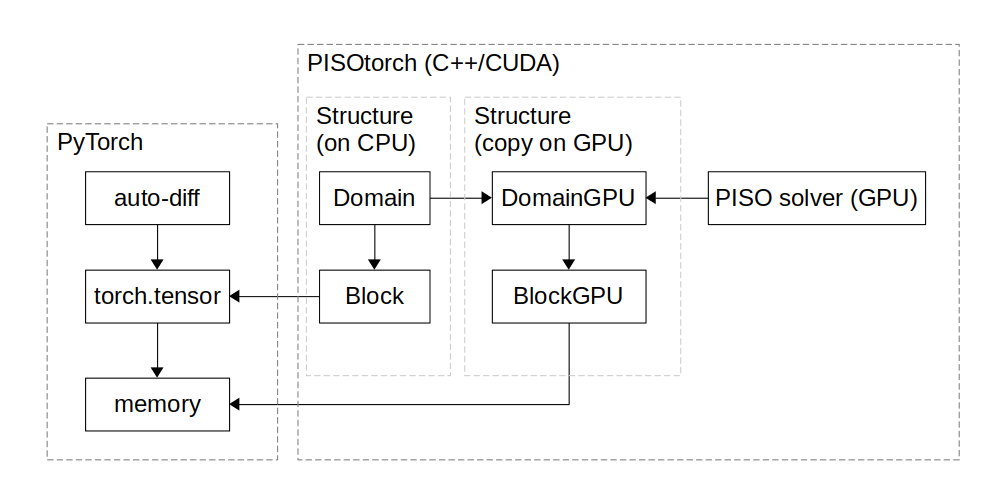
Domain/Block structure lives on the CPU and references torch.tensors. For a solve, it is packed into GPU-side copies (DomainGPU, BlockGPU) that hold raw pointers into the same tensor memory.All field data is stored in ordinary PyTorch tensors on the GPU. The domain with its blocks only provides the structural information and holds references to the tensors. For simulation, the structure is packed and copied to the GPU as internal DomainGPU and BlockGPU structures. These contain raw memory pointers to the memory underlying the tensors. Each simulation step overwrites this memory with its result, unless the differentiable mode is used.
This design has an important consequence: PyTorch knows nothing about the domain–block setup or the simulation, and the GPU solver knows nothing about PyTorch's autograd. The PISOtorch_diff wrapper bridges the two. In each step it replaces the tensors held by the domain and its blocks with new ones, which keeps the autograd graph intact.
Tensor layout¤
Fields use the PyTorch "channels first" layout, NCDHW in 3D, NCHW in 2D and NCW in 1D:
- N, the batch dimension, must always be 1.
- C holds channels, such as the components of a vector or several passive scalars.
- Spatial dimensions are in
zyxorder (D = depth/z, H = height/y, W = width/x). - Vector components in the channel dimension are in
xyzorder.
| Quantity | 2D shape | 3D shape | Notes |
|---|---|---|---|
block.velocity |
[1, 2, y, x] |
[1, 3, z, y, x] |
components (u, v[, w]) |
block.pressure |
[1, 1, y, x] |
[1, 1, z, y, x] |
|
block.passiveScalar |
[1, S, y, x] |
[1, S, z, y, x] |
S = passiveScalarChannels |
block.vertexCoordinates |
[1, 2, y+1, x+1] |
[1, 3, z+1, y+1, x+1] |
cell corners, coordinates in xyz order |
block.velocitySource |
[1, 2] or [1, 2, y, x] |
[1, 3] or [1, 3, z, y, x] |
static (one value) or per cell |
block.viscosity |
[1, 1] or [1, 1, y, x] |
[1, 1] or [1, 1, z, y, x] |
optional, replaces the domain viscosity on this block |
domain.viscosity |
[1] |
[1] |
CPU tensor |
Each block needs at least 3 cells along every axis. Tensors handed to PICT must be on the GPU and contiguous; call .cuda().contiguous() when in doubt.
Life cycle of a setup¤
The following script simulates a plane Poiseuille flow, one of the validation cases of the paper: a channel of height 1 with no-slip walls, periodic in x, driven by a constant body force \(G = 1\). With \(\nu = 1\), the steady state is the parabola \(u(y) = \tfrac{G}{2\nu}\,y(1-y)\) with a maximum of 0.125.
import torch
import PISOtorch, PISOtorch_simulation
import lib.data.shapes as shapes

dims, dtype = 2, torch.float32
viscosity = torch.tensor([1.0], dtype=dtype)        # CPU tensor, shape [1]

# 1. the domain: global settings
domain = PISOtorch.Domain(dims, viscosity, name="Channel",
                          device=torch.device("cuda"), dtype=dtype,
                          passiveScalarChannels=0)

# 2. a block from vertex coordinates: here the unit square with 16 x 16 cells
grid = shapes.make_wall_refined_ortho_grid(16, 16)   # shape [1, 2, 17, 17]
block = domain.CreateBlock(vertexCoordinates=grid.cuda().contiguous(), name="Block")

# 3. boundaries: all faces are periodic by default
block.CloseBoundary("-y")    # no-slip walls at -y and +y, x stays periodic

# a constant body force G = 1 in +x drives the flow through the periodic channel
block.setVelocitySource(torch.tensor([[1.0, 0.0]], device="cuda", dtype=dtype))

# 4. finalize: validates the setup and allocates matrices, RHS and result tensors
domain.PrepareSolve()

# 5. simulate (no output directory, so image output is switched off)
sim = PISOtorch_simulation.Simulation(domain=domain, time_step=0.1, non_orthogonal=False, log_images=False)
sim.run(iterations=50)

u = block.velocity[0, 0, :, 0]                       # u(y) at the cell centers
y = block.getCellCoordinates()[0, 1, :, 0]
print(float(torch.max(torch.abs(u - 0.5 * y * (1 - y)))))   # deviation from the analytic profile
After 50 steps of size 0.1, the flow has reached its steady state: the script prints a deviation of about \(5\cdot10^{-4}\) from the analytic profile, whose maximum is 0.125. Instead of vertex coordinates, a block can also be created from a resolution alone with domain.CreateBlockWithSize(PISOtorch.Int4(x=16, y=16)), which gives cells of unit size (see Grids).
Two calls keep the CPU structure and the GPU copy consistent:
domain.PrepareSolve()must be called once after the setup is complete, before aSimulationis created, and again after structural changes. It checks the setup for validity and creates the secondary tensors: matrices, right-hand sides, results and gradients.domain.UpdateDomainData()must be called whenever you replace a tensor, e.g. withblock.setVelocity(...),block.setVelocitySource(...)orboundary.setVelocity(...). It refreshes the pointers in the packed GPU structure. Every callback that sets tensors on the domain should end with it.
Modifying a tensor in place (e.g. block.velocity[:, 0] = 1.0) keeps its memory and needs no update. In the differentiable mode, however, prefer setting new tensors so that autograd can track the change.
Copy, Clone and Detach¤
| Method | Structure | Tensors | Typical use |
|---|---|---|---|
domain.Copy() |
new Domain/Block/boundary objects |
shared with the original | a per-iteration domain for training: a differentiable run creates new tensors, so the original stays untouched |
domain.Clone() |
new objects | deep copies | an independent reference/target simulation |
domain.Detach() |
— | detached from the autograd graph (forward and gradient tensors) | after every optimization step, to break reference cycles between the domain and the graph |
Call PrepareSolve() on a copy or clone before using it.
Shared tensors
A Copy() shares the underlying tensors with its original. Running a non-differentiable simulation on the copy overwrites them in place, so it changes both domains. A differentiable simulation writes new tensors and leaves the original unchanged.
Saving and loading¤
from lib.util.domain_io import save_domain, load_domain

save_domain(domain, "runs/state")          # writes runs/state.json (structure) + runs/state.npz (tensors)
domain = load_domain("runs/state", dtype=torch.float32, device=torch.device("cuda"))
domain.PrepareSolve()                      # load_domain does not allocate the solver tensors
Simulation(save_domain_name="domain", log_dir=...) saves the final state of a run in the same format.
The simulation driver¤
Low-level operators such as PISOtorch.SetupAdvectionMatrix, PISOtorch.SolveLinear and PISOtorch.CorrectVelocity are exposed individually (see the API reference). Usually you do not call them yourself. PISOtorch_simulation.Simulation combines them into full PISO time steps and provides:
- fixed or CFL-adaptive time stepping,
- callbacks at many points of the step,
- logging, image and VTK output,
- a single switch,
differentiable=True, that routes every operator through the autograd-enabledPISOtorch_diffbackend.
See Running Simulations.